
Horizon Fitness · A practical guide
How to plan a workout around your equipment and time
Start with the equipment you can actually use and the time you have for the whole session. Add your goal, experience, and realistic weekly availability, then review the resulting plan before using it.
Describe the session you can actually make room for.
A workout planner needs more than a goal. A plan can look appealing and still be awkward to use if it assumes equipment you do not have or a session longer than your available time. Start by making those constraints explicit.
- Equipment: list what you can reliably access. “Full gym” describes a different set of options from a pair of dumbbells at home. If a machine is usually unavailable, treat that as something to review.
- Session length: give the planner the time available for the workout, including preparation and transitions. A list of exercises is not a guarantee that you can finish within the estimate.
- Weekly availability: choose days you can realistically use, rather than the most ambitious schedule you can imagine.
- Goal and experience: describe your current starting point so the suggested plan has relevant context.
These are inputs to a planning tool. They do not establish that a particular exercise or workload is appropriate for you. Review the output against your own circumstances before using it.
Watch those choices become a starting plan.
This 63-second development walkthrough uses a disposable example profile called Alex. It selects a strength goal, a beginner experience level, three days a week, a 45-minute session limit, and full-gym equipment. These are example inputs, not a recommended schedule.
- Set the context. The onboarding flow collects the goal and experience level before asking about the practical constraints.
- Choose availability and equipment. The example supplies weekly frequency, session length, and equipment access.
- Review the plan. Horizon presents a starting plan, then returns to the Today screen. The plan is a place to review and adjust the details, not a requirement to accept every suggestion.
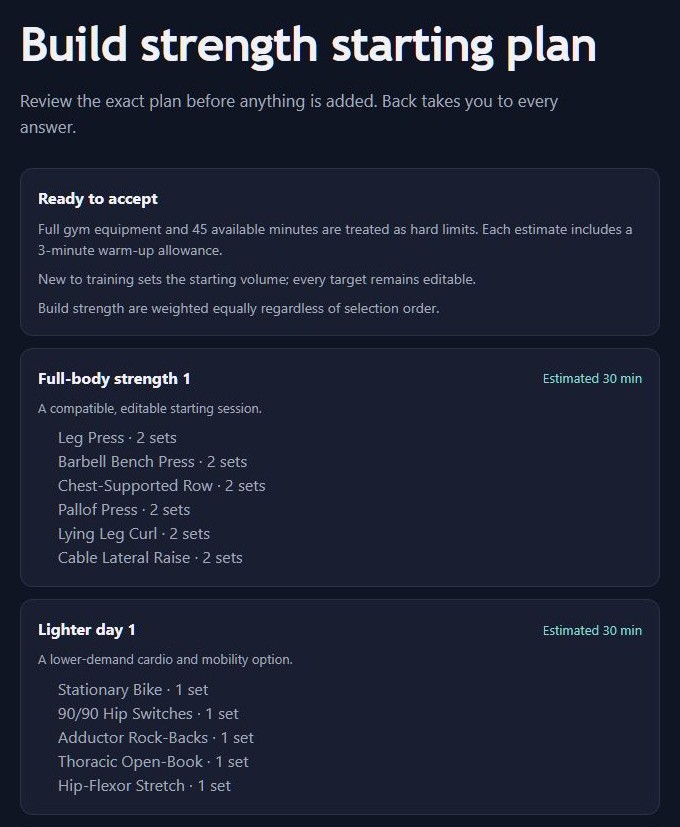
The accompanying development plan preview labels full-gym equipment and the 45-minute cap as limits. One session has a shorter estimate of 30 minutes, including a stated three-minute warm-up allowance. A limit is a ceiling, not a promise to fill every minute; an estimate is not measured completion time.
Review the result before you rely on it.
Check whether each listed exercise uses equipment you have, whether the sequence is practical in your space, and whether the whole session fits your available window. The preview exposes editable targets so you can inspect the details instead of treating the first result as final.
Useful feedback for a workout planner:
“I selected ___ minutes and ___ equipment. The plan assumed ___. I would need to change ___ to use it.”
That kind of feedback helps distinguish an input the planner misunderstood from an estimate that does not match real use. It is also more actionable than saying a plan feels too long.
Can I try Horizon on an iPhone?
Horizon Fitness is currently an Android app with web app capabilities. iPhone browser readiness is still being assessed. The beta waitlist is open, and invitations will explain supported devices when testing is available; there is no iPhone app or immediate access being announced here.
From the foundry
See what’s taking shape.
Horizon Fitness is in development; the previews show work in progress. Joining the waitlist registers your interest. Testing invitations will follow when opportunities are available.
Explore the product and testing details