
 Melon Fitness
A workout plan that starts with your life.
Start with the equipment you can use and the time you can make room for. Melon Fitness turns those choices and your training goals into a starting plan you can review.
Invite-only betaJoin the waitlist for future testing invitations.
See your choices become a plan.
The silent 63-second tour follows Alex through setup, editable plan choices, an exercise guide and the Today screen. The written walkthrough below explains the choices and output.
Personalized workout planning
Give your week a practical starting routine.
For people who want structure without assembling every workout from scratch. Make your constraints explicit, then check the proposed sessions against your equipment and the time you actually have.
- Your starting inputs
- Goal, experience, equipment, training days and session length.
- The plan to review
- Sessions with time estimates and editable exercise targets.
- The practical check
- Does each session fit the setup and time you described?
Follow one set of choices into a workout.
Follow Alex’s sample plan from setup to a first workout. Review the exercise targets, adjust a rest interval, and see how a saved workout looks in History.
1. Start with the week you have.
- Goal
- Build strength
- Experience
- New to training
- Availability
- 3 days a week
- Time limit
- 45 minutes per workout
- Equipment
- Full gym, no exercise exclusions
Alex uses pounds, miles and Next in plan ordering. Setup also offers optional equipment additions and searchable exercise exclusions.
2. Review a concrete starting workout.
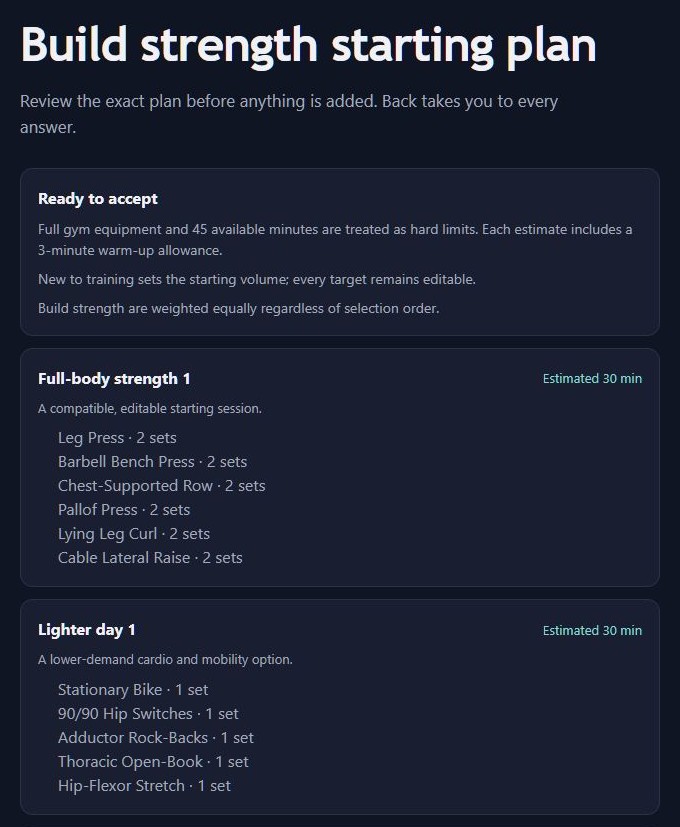
The result is two full-body strength sessions estimated at 40 minutes each and one lighter session estimated at 30 minutes. Use the Edit links to revisit your choices, or open an exercise name to read its guide before accepting the plan.
| Exercise | Starting target | Rest |
|---|---|---|
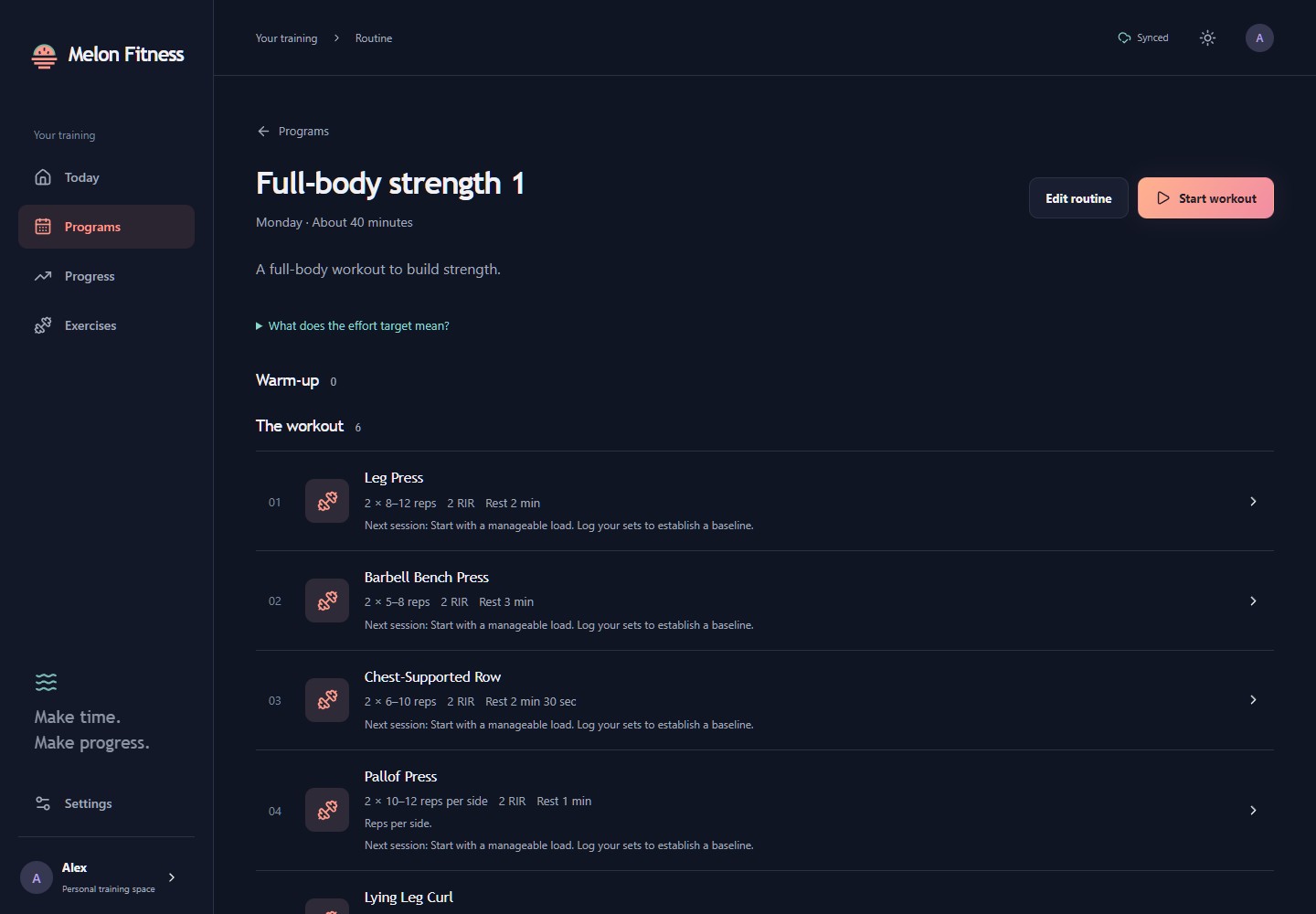
| Leg Press | 2 sets of 8–12 reps | 2 min |
| Barbell Bench Press | 2 sets of 5–8 reps | 3 min |
| Chest-Supported Row | 2 sets of 6–10 reps | 2 min |
The session also includes Pallof Press, Lying Leg Curl and Cable Lateral Raise. Open the full plan to see every target and the expanded About this plan explanation. Its estimates include work on both sides, rest, side switches, transitions and a three-minute warm-up allowance.
3. Make the plan your own.
Use Edit routine to change a target before training. Here, Chest-Supported Row rest changes from 2 minutes to 2 minutes 30 seconds. Save the routine, and the new interval appears in the workout too.
The time estimate stays at 40 minutes in this example, so review your time allowance when you change a target.
4. Keep a record you can come back to.
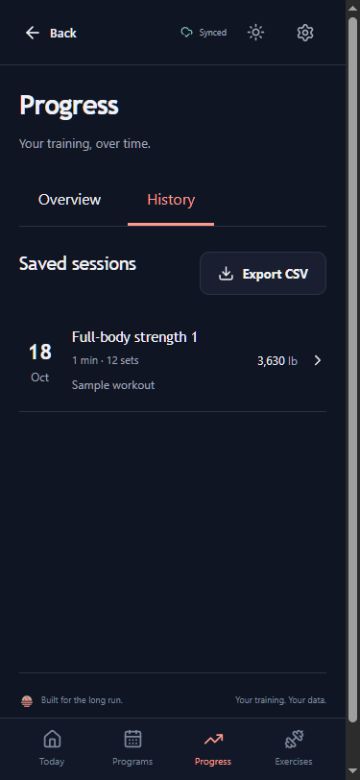
Log weights, reps and effort as you go, then save the workout. This 12-set sample shows how the sets and a session note come together in History, ready to revisit. Today moves on to the next session in the plan.
Where it stands.
Melon Fitness is in an invite-only beta. Explore a sample plan, adjust its exercise targets, and see how saved workouts come together in History.
Before you sign up.
A few things to know about Melon Fitness.
Will it work on my phone?
Melon Fitness has an Android app and web access. The invite-only beta includes an iPhone Safari setup guide for adding the web app to the Home Screen; there is no native iPhone app. Invitations explain setup and supported devices.
Is beta testing free?
Yes. Joining the waitlist and using Melon Fitness during beta testing are free. We’d like your feedback on how the plan fits your equipment, schedule and workouts. Joining does not guarantee an invitation or a date. Pricing after beta has not been announced.
Help shape Melon Fitness.
Want a workout plan built around your routine? Join the beta waitlist to help test plans shaped by your goals, equipment, and available training days.
What happens next. Use the private link in your inbox to confirm your choices.
After confirming, you’ll receive the emails you select. If a beta invitation becomes available, it will include access instructions and a way to share feedback.
Have a question? Get in touch.